
This is an info Alert.
SnapKey Logo
  • Solutions
      • Solutions
      • SnapKey Residential
      • SnapKey Utility
      • SnapKey Public
      • SnapKey Logistics
      • SnapKey Sensors
      • Guest Check-in
      • Reactivatable Keys
      • Self-service Rentals
  • Industries
      • Industries
      • Utility companies
      • Residential buildings
      • Office buildings & Coworking spaces
      • Logistics
      • Holiday homes
      • Public restrooms
      • Construction sites
      • Unmanned stores
      • Temporary lockers
      • Virtual Keybox
  • Resources
      • Resources
      • Knowledge
      • Videos
      • API documentation
      • Trust & Security
      • System status
  • Partners
  • Company
      • Company
      • About us
      • Why SnapKey
      • Contact
auth.sign_inBook a demo

API and Webhook Integrations – Automate Your Access Control with SnapKey

Complete technical guide to SnapKey's REST API, webhooks, MQTT, and integrations. Perfect for developers who want to automate access control and integrate with existing systems.
4. December 2025
7 min
API and Webhook Integrations – Automate Your Access Control with SnapKey

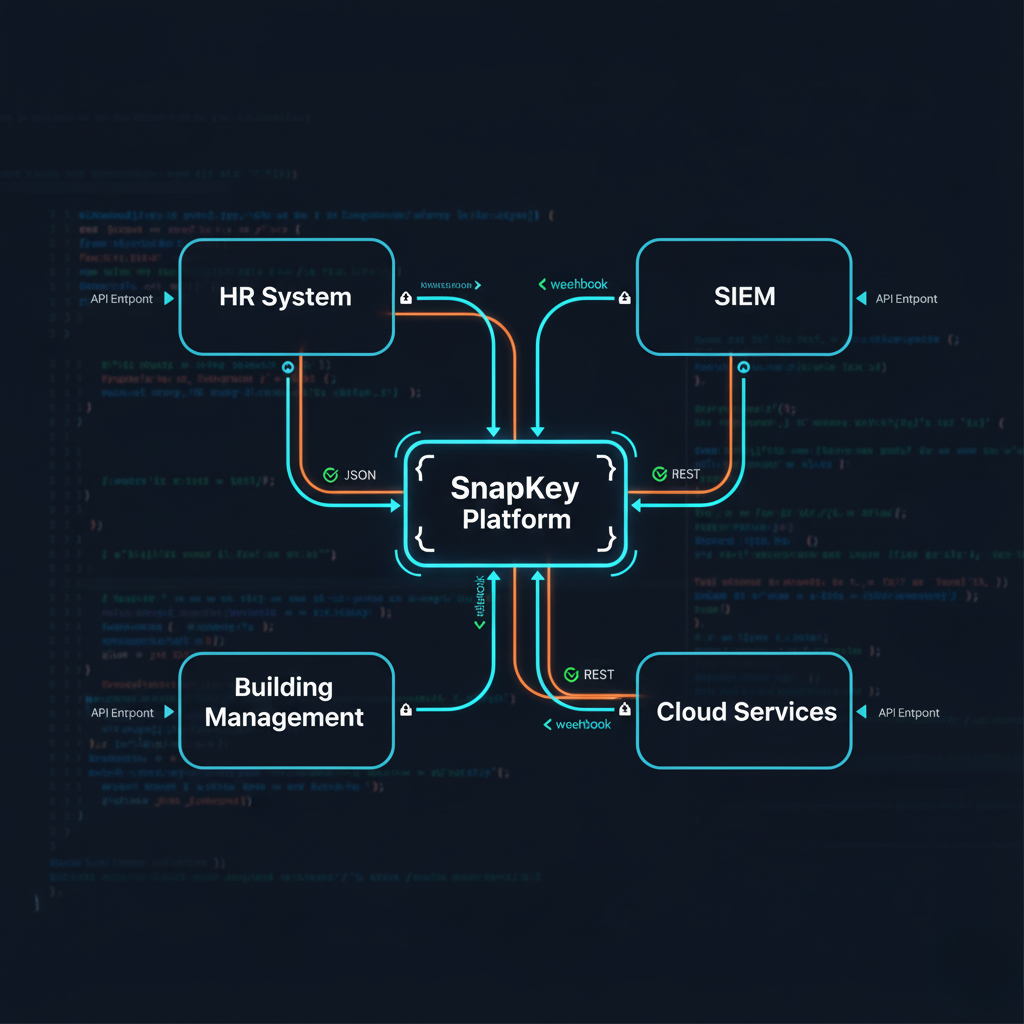
SnapKey offers a fully RESTful API and real-time webhooks to integrate access control with your existing systems. This guide is written for developers and IT architects who want to automate access management.


Integration Options

REST API

Full CRUD API for keys, users, locks, logs, and configuration

Webhooks

Real-time push notifications when events occur

MQTT

IoT protocol for real-time communication with devices

GraphQL

Flexible query language for complex data fetching

OAuth 2.0

Modern authentication with scoped access tokens

Bulk Operations

Batch import/export via CSV, JSON, and XML


REST API Overview

Authentication

# Obtain access token
curl -X POST https://api.snapkey.dk/v1/auth/token \
  -H "Content-Type: application/json" \
  -d '{
    "client_id": "your_client_id",
    "client_secret": "your_client_secret",
    "grant_type": "client_credentials"
  }'

# Response
{
  "access_token": "eyJhbGciOiJSUzI1NiIsInR5cCI6IkpXVCJ9...",
  "token_type": "Bearer",
  "expires_in": 3600
}

Core Endpoints

Base URL: https://api.snapkey.dk/v1

Authentication:
├─ POST   /auth/token          # Get access token
└─ POST   /auth/refresh        # Refresh token

Users:
├─ GET    /users               # List users
├─ GET    /users/{id}          # Get user details
├─ POST   /users               # Create user
├─ PATCH  /users/{id}          # Update user
└─ DELETE /users/{id}          # Delete user

Keys:
├─ GET    /keys                # List keys
├─ GET    /keys/{id}           # Get key details
├─ POST   /keys                # Issue new key
├─ PATCH  /keys/{id}           # Update key permissions
└─ DELETE /keys/{id}           # Revoke key

Locks:
├─ GET    /locks               # List all locks
├─ GET    /locks/{id}          # Get lock details
├─ GET    /locks/{id}/status   # Get real-time status
└─ POST   /locks/{id}/unlock   # Remote unlock (emergency)

Access Logs:
├─ GET    /logs/access         # Query access logs
├─ GET    /logs/access/{id}    # Get specific event
└─ GET    /logs/access/export  # Export logs (CSV/JSON)

Webhooks:
├─ GET    /webhooks            # List webhook subscriptions
├─ POST   /webhooks            # Create webhook
├─ PATCH  /webhooks/{id}       # Update webhook
└─ DELETE /webhooks/{id}       # Delete webhook

Common Use Cases

Use Case 1: Automatic Onboarding

Scenario: New employee in HR system → automatic key provisioning

import requests

class SnapKeyIntegration:
    def __init__(self, api_key):
        self.base_url = "https://api.snapkey.dk/v1"
        self.headers = {
            "Authorization": f"Bearer {api_key}",
            "Content-Type": "application/json"
        }

    def onboard_employee(self, employee_data):
        # 1. Create user in SnapKey
        user_payload = {
            "email": employee_data["email"],
            "first_name": employee_data["first_name"],
            "last_name": employee_data["last_name"],
            "department": employee_data["department"],
            "role": employee_data["role"]
        }

        user_response = requests.post(
            f"{self.base_url}/users",
            json=user_payload,
            headers=self.headers
        )
        user_id = user_response.json()["id"]

        # 2. Issue keys based on department
        locks = self.get_locks_for_department(employee_data["department"])

        key_payload = {
            "user_id": user_id,
            "locks": locks,
            "valid_from": employee_data["start_date"],
            "valid_until": None,  # Permanent until terminated
            "time_restrictions": {
                "monday": {"start": "07:00", "end": "19:00"},
                "tuesday": {"start": "07:00", "end": "19:00"},
                "wednesday": {"start": "07:00", "end": "19:00"},
                "thursday": {"start": "07:00", "end": "19:00"},
                "friday": {"start": "07:00", "end": "19:00"}
            }
        }

        key_response = requests.post(
            f"{self.base_url}/keys",
            json=key_payload,
            headers=self.headers
        )

        # 3. Send welcome email with QR code
        self.send_welcome_email(user_id, key_response.json()["qr_code_url"])

        return {"user_id": user_id, "key_id": key_response.json()["id"]}

Use Case 2: Temporary Contractor Access

// Node.js example: Issue temporary key to contractor

const axios = require('axios');

async function grantContractorAccess(contractor, project) {
  const snapkey = axios.create({
    baseURL: 'https://api.snapkey.dk/v1',
    headers: {
      'Authorization': `Bearer ${process.env.SNAPKEY_API_KEY}`,
      'Content-Type': 'application/json'
    }
  });

  try {
    // 1. Create temporary user
    const userResponse = await snapkey.post('/users', {
      email: contractor.email,
      first_name: contractor.first_name,
      last_name: contractor.last_name,
      company: contractor.company,
      tags: ['contractor', 'temporary']
    });

    const userId = userResponse.data.id;

    // 2. Issue time-limited key
    const keyResponse = await snapkey.post('/keys', {
      user_id: userId,
      locks: project.authorized_locks,
      valid_from: project.start_date,
      valid_until: project.end_date,
      time_restrictions: {
        monday: { start: '08:00', end: '17:00' },
        tuesday: { start: '08:00', end: '17:00' },
        wednesday: { start: '08:00', end: '17:00' },
        thursday: { start: '08:00', end: '17:00' },
        friday: { start: '08:00', end: '17:00' }
      },
      max_uses: 50  // Maximum 50 uses
    });

    // 3. Send SMS with access instructions
    await sendSMS(contractor.phone, {
      message: `Your access to ${project.name} is now active.
                Scan QR code: ${keyResponse.data.qr_code_url}`
    });

    return {
      user_id: userId,
      key_id: keyResponse.data.id,
      expires: project.end_date
    };

  } catch (error) {
    console.error('Failed to grant contractor access:', error.response.data);
    throw error;
  }
}

Webhooks

Setting Up Webhooks

# Create webhook subscription
curl -X POST https://api.snapkey.dk/v1/webhooks \
  -H "Authorization: Bearer YOUR_TOKEN" \
  -H "Content-Type: application/json" \
  -d '{
    "url": "https://your-server.com/webhooks/snapkey",
    "events": [
      "access.granted",
      "access.denied",
      "key.created",
      "key.revoked",
      "door.forced"
    ],
    "secret": "your_webhook_secret_for_verification"
  }'

Available Events

Access Events:
├─ access.granted        # Successful access
├─ access.denied         # Access denied
├─ access.expired        # Attempted use of expired key
└─ access.invalid        # Invalid credentials

Key Events:
├─ key.created           # New key issued
├─ key.updated           # Key permissions changed
├─ key.revoked           # Key revoked
└─ key.expired           # Key reached expiration

Lock Events:
├─ lock.online           # Lock came online
├─ lock.offline          # Lock went offline
├─ door.forced           # Door forced open (sensor)
└─ door.left_open        # Door left open (timeout)

User Events:
├─ user.created          # New user added
├─ user.updated          # User details changed
└─ user.deleted          # User removed

Webhook Handler Example

from flask import Flask, request, jsonify
import hmac
import hashlib

app = Flask(__name__)
WEBHOOK_SECRET = "your_webhook_secret"

@app.route('/webhooks/snapkey', methods=['POST'])
def snapkey_webhook():
    # 1. Verify signature
    signature = request.headers.get('X-SnapKey-Signature')
    payload = request.get_data()

    expected_signature = hmac.new(
        WEBHOOK_SECRET.encode(),
        payload,
        hashlib.sha256
    ).hexdigest()

    if not hmac.compare_digest(signature, expected_signature):
        return jsonify({"error": "Invalid signature"}), 401

    # 2. Parse event
    event = request.json
    event_type = event['type']

    # 3. Handle different event types
    if event_type == 'access.granted':
        handle_access_granted(event['data'])
    elif event_type == 'access.denied':
        handle_access_denied(event['data'])
    elif event_type == 'door.forced':
        handle_security_alert(event['data'])

    return jsonify({"status": "received"}), 200

def handle_security_alert(data):
    """Immediate response to forced door"""
    send_sms_to_security({
        "message": f"ALARM: Door forced at {data['lock_name']}",
        "location": data['location_coordinates']
    })
    trigger_video_recording(data['lock_id'])

Integration Patterns

Pattern 1: HR System Sync

HR System → API → SnapKey
├─ Employee hired → Create user + issue keys
├─ Department change → Update key permissions
├─ Employee terminated → Revoke all keys immediately
└─ Daily sync → Verify consistency

Pattern 2: Building Management System (BMS)

def access_event_handler(access_event):
    """When someone enters a room, adjust HVAC"""

    if access_event['type'] == 'access.granted':
        room = access_event['lock']['room']

        # Turn on lights
        bms.set_lights(room, state='on')

        # Adjust temperature
        bms.set_temperature(room, target=21)

        # Schedule auto-off after 2 hours
        schedule_room_reset(room, delay_minutes=120)

Pattern 3: Visitor Management

async function registerVisitor(visitor, host, duration_hours) {
  // 1. Create temporary user
  const user = await snapkey.post('/users', {
    email: visitor.email,
    first_name: visitor.first_name,
    last_name: visitor.last_name,
    tags: ['visitor'],
    metadata: {
      host_employee: host.email,
      company: visitor.company
    }
  });

  // 2. Issue time-limited key
  const key = await snapkey.post('/keys', {
    user_id: user.id,
    locks: ['lobby_entrance', 'meeting_room_a'],
    valid_from: new Date().toISOString(),
    valid_until: new Date(Date.now() + duration_hours * 3600000).toISOString()
  });

  // 3. Print visitor badge with QR code
  await printBadge({
    name: visitor.first_name + ' ' + visitor.last_name,
    qr_code: key.qr_code_url,
    valid_until: key.valid_until
  });

  return key;
}

Rate Limits & Best Practices

Rate Limits

Standard tier:
├─ 1000 requests/hour
└─ 100 webhook deliveries/minute

Enterprise tier:
├─ 10,000 requests/hour
├─ 1000 webhook deliveries/minute
└─ Dedicated API endpoints

Best Practices

  1. Cache responses – Don't fetch the same data repeatedly
  2. Use webhooks instead of polling when possible
  3. Implement exponential backoff for retries
  4. Batch operations when creating multiple keys
  5. Use GraphQL for complex queries to reduce roundtrips
  6. Monitor API usage to avoid rate limits

FAQ

Is API access included in all licenses?

API access is included in Enterprise licenses. Contact us for pricing on other tiers.

How fast are webhooks delivered?

Webhooks are typically sent within 1 second of the event. We guarantee delivery with automatic retries.

Can I test the API without affecting production?

Yes, we offer a complete sandbox environment at https://sandbox-api.snapkey.dk/v1


Contact Us

Need help getting started with the SnapKey API? Our developer team is ready to help.

Contact Developer Team
Related articles
CER Directive – Complete Guide to Critical Infrastructure Compliance

Understand the CER Directive (EU 2022/2557) and learn how SnapKey helps secure your critical infrastructure with advanced access control and compliance.

Access Control for District Heating – Secure Access to Substations and Cabinets

Digital access control for district heating companies. Replace lockboxes with traceable access to heat substations, exchanger stations, and technical rooms.

Access Control for Electricity Grid and Substations – CER & NIS2 Ready

Secure access to transformer stations, grid components, and technical rooms. Meet CER and NIS2 with battery-free, offline access control from SnapKey.


SnapKey Logo

SnapKey is your digital key for all types of locks. Easily open doors and locks directly from your smartphone, and enjoy fast, secure and flexible access without physical keys or extra apps. Perfect for private homes, businesses and shared spaces.

Solutions
SnapKey ResidentialSnapKey UtilitySnapKey PublicSnapKey LogisticsGuest Check-in
Developers
API documentationAPI referenceWebhooksChangelogSystem status
Company
About usWhy SnapKeyBecome a partnerKnowledgeVideosContact us
Legal
Terms & ConditionsPrivacy PolicyTrust & Security
Contact
SnapKey ApS+45 3242 9050info@snapkey.dk

© All rights reserved.